
FreshBooks Review 2026: FreshBooks is a cloud-based accounting and business management platform designed to help freelancers and small businesses manage invoicing, payments, expenses, time tracking, and financial reporting.
FreshBooks is designed to bring many of these everyday financial and business tasks into one platform. It combines invoicing, payments, expense tracking, time tracking, accounting, reporting, project management, estimates, proposals, and other business tools.
In this detailed FreshBooks review, we’ll examine its main features, pricing, advantages, disadvantages, ease of use, and the types of businesses that can benefit most from the platform.
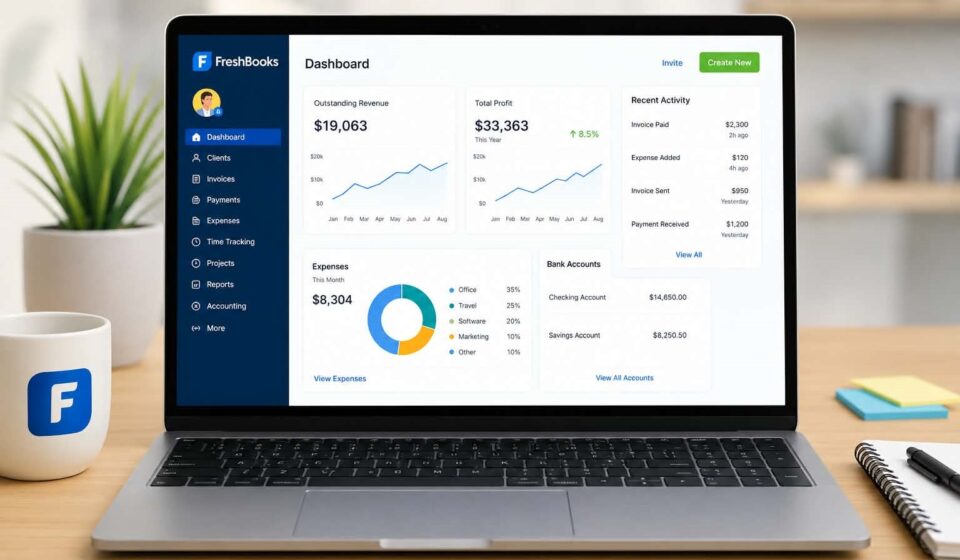
FreshBooks Review 2026 dashboard
What Is FreshBooks?
FreshBooks is cloud-based accounting and business management software primarily designed for freelancers, self-employed professionals, service-based businesses, and small businesses.
The platform currently includes tools for:
- Invoicing
- Online payments
- Expense tracking
- Time tracking
- Accounting
- Financial reporting
- Project management
- Estimates
- Proposals
- Client management
- Mileage tracking
- Payroll
- Team management
- Mobile apps
- Bookkeeping
FreshBooks Features
1. Professional Invoicing
Invoicing is one of FreshBooks’ core features.
Why it matters
A good invoicing system can help businesses:
- Reduce manual data entry
- Create invoices faster
- Track outstanding payments
- Automate recurring invoices
- Include billable expenses
- Include tracked time
- Improve the overall client experience
2. Online Payments
FreshBooks also supports online payments, allowing businesses to give clients convenient ways to pay invoices.
Depending on the setup and eligibility, payment options can include credit cards and bank transfers, while FreshBooks also supports additional payment methods through its payment ecosystem.
The advantage is that invoicing and payment tracking can remain connected rather than requiring a separate system.
For small businesses, this can make cash-flow management considerably easier.
3. Expense Tracking
Keeping track of business expenses is another major part of FreshBooks.
The platform supports expense tracking, bank connections, receipt scanning, and automated expense categorization.
This means business owners can maintain a clearer picture of where their money is going without relying entirely on spreadsheets.
For businesses with frequent expenses, this can become one of FreshBooks’ most useful features.
4. Time Tracking
If you bill clients by the hour, accurate time tracking is essential.
FreshBooks allows users to start a timer and record billable hours. Those tracked hours can then be added to invoices.
The company also offers time tracking through its mobile app and a Chrome Timer, while integrations can connect time tracking with tools such as Asana, Basecamp, Trello, and Teamwork.
Example
Imagine a freelance developer spends:
- 2 hours on research
- 4 hours coding
- 1 hour testing
- 1 hour communicating with the client
Instead of manually calculating those hours at the end of the month, FreshBooks can keep a running record that can be used for billing.
That makes the process much more efficient.
5. Accounting and Financial Reports
FreshBooks has expanded beyond simple invoicing and now offers more comprehensive accounting functionality.
Depending on the plan, users can access accounting reports including:
- Profit & Loss
- Balance Sheet
- Cash Flow
- General Ledger
- Journal Entries
- Trial Balance
Double-entry accounting features are available on Plus, Premium, and Select plans.
FreshBooks also supports bank reconciliation, allowing bank transactions to be matched against FreshBooks entries.
FreshBooks in 2026
has continued updating its reporting tools during 2026.
The company says its Profit & Loss, Balance Sheet, General Ledger, and Revenue by Client reports were rebuilt with features such as drill-down views, customizable layouts, and summary/detail views.
That is important because it shows FreshBooks is continuing to develop its accounting capabilities rather than remaining primarily an invoicing platform.
6. Project Management
FreshBooks isn’t only about accounting.
Businesses can also use the platform to organize projects, track time, monitor expenses, and understand project profitability.
This is particularly useful for agencies and professional service businesses where profitability depends on understanding how much time and money is being spent on individual clients.
For example, an agency could compare:
Client Revenue → Labor Hours → Expenses → Project Profitability
That provides much more useful information than simply knowing how much the client was invoiced.
7. Estimates and Proposals
Before a client becomes a customer, many businesses need to send an estimate or proposal.
FreshBooks supports estimates and proposals, helping businesses move from the initial quote to invoicing within the same ecosystem.
Depending on the plan, FreshBooks also supports features such as client retainers and electronic signatures.
This can simplify the sales-to-payment workflow.
FreshBooks Pricing
FreshBooks pricing changes depending on the selected plan, billing period, country, and promotional offers.
At the time of writing, the standard U.S. pricing page lists four main tiers:
| Plan | Regular Monthly Price* | Main Focus |
|---|---|---|
| Lite | $21/month | Freelancers and smaller client lists |
| Plus | $38/month | Growing businesses |
| Premium | $65/month | Businesses with larger client bases |
| Select | Custom | More advanced business needs |
*FreshBooks currently displays promotional offers, so the price shown during signup may be significantly lower than the regular price.
Lite
The Lite plan includes features such as unlimited invoices for up to five clients, expense tracking, estimates, time tracking, online payments, and tax-time reports.
Plus
Plus increases the client limit to 50 and adds features such as proposals, retainers, accounting reports, receipt scanning, and accountant access.
Premium
Premium supports unlimited clients and adds functionality such as project profitability, additional reporting, bill receipt scanning, and customized email templates.
Select
Select is intended for businesses requiring more advanced services, support, payment options, and customization.
FreshBooks also provides a 30-day trial, allowing users to test the platform before committing to a subscription.
FreshBooks Pros and Cons
Pros
Easy invoicing
Creating and sending professional invoices is one of FreshBooks’ strongest use cases.
Strong time tracking
Freelancers and service businesses can track billable hours and connect them to invoices.
Expense management
Receipt scanning and bank connections can reduce manual expense management.
Useful accounting tools
FreshBooks now offers considerably more advanced accounting and reporting functionality than a basic invoicing application.
Good for service businesses
The combination of clients, projects, time, expenses, and invoices makes the platform particularly suitable for professional services.
Cloud-based
Business information can be accessed through the web and supported mobile applications.
Cons
Pricing can become expensive
As a business grows, moving to higher tiers can increase the monthly cost.
Client limits on lower plans
The lower tiers restrict the number of clients that can be invoiced.
Some advanced features require higher plans
Accounting, reporting, and other advanced functionality isn’t available equally across every tier.
May be more than a freelancer needs
A very small business that only needs basic invoicing may not need the full range of FreshBooks features.
Is FreshBooks Easy to Use?
One of FreshBooks’ biggest advantages is its focus on simplifying business administration.
The workflow is relatively straightforward:
Create Client → Create Project → Track Time & Expenses → Send Invoice → Receive Payment → Review Reports
That workflow makes particular sense for freelancers and service-based companies.
Instead of jumping between multiple applications, users can manage many parts of their client billing and financial workflow from one platform.
Who Should Use FreshBooks?
FreshBooks can be a strong option for:
Freelancers
Designers, developers, writers, consultants, photographers, and other independent professionals can benefit from time tracking, invoicing, expenses, and payments.
Agencies
Agencies can use projects, team features, time tracking, expenses, and profitability tools to understand how individual clients affect their bottom line.
Consultants
Consultants who bill hourly or by project can connect their work, expenses, and invoices.
Small Service Businesses
Businesses that don’t sell physical products and instead rely on client relationships and professional services can get significant value from FreshBooks.
Who May Not Need FreshBooks?
FreshBooks may not be the best fit for everyone.
If you only need to create a few basic invoices and have almost no accounting requirements, a simpler invoicing application could be enough.
Likewise, businesses with highly complex inventory, manufacturing, or enterprise-level accounting requirements may need specialized software designed specifically for those workflows.
FreshBooks vs. Spreadsheets
Many small businesses start with spreadsheets.
At first, this seems practical.
You can create a simple table containing:
Client → Invoice → Amount → Payment Status → Expenses
But as the business grows, spreadsheets become increasingly difficult to maintain.
FreshBooks can automate many of these processes and connect invoices, payments, expenses, time tracking, projects, and accounting information.
That can save considerable administrative time.
FreshBooks Review: Is It Worth It in 2026?
For freelancers and small service businesses, FreshBooks can be worth considering.
Its biggest advantage isn’t any single feature. It’s the way multiple business processes work together.
You can track a client’s project, record your time, capture expenses, create an invoice, receive payment, and review financial reports without building the entire workflow yourself.
FreshBooks has also continued investing in accounting and reporting features in 2026, including updated financial reports and additional payment and payroll improvements.
The main question is whether you will actually use enough of those features to justify the subscription.
If you only need basic invoicing, there may be cheaper alternatives.
But if you need invoicing + payments + expenses + time tracking + accounting + reporting + project management, FreshBooks becomes much more compelling.
Final Verdict
FreshBooks is a well-rounded business platform aimed primarily at freelancers, professionals, and small service-based businesses.
Its strongest areas are invoicing, time tracking, expense management, payments, and increasingly sophisticated accounting and reporting.
The platform isn’t necessarily the cheapest option available, but its integrated approach can make it valuable for businesses that want to reduce administrative work and keep their financial information organized.
Our verdict: FreshBooks is a strong choice for freelancers and small service businesses looking for an all-in-one solution for billing, accounting, and financial management.
Frequently Asked Questions
Is FreshBooks accounting software?
Yes. FreshBooks provides accounting features alongside invoicing, payments, expenses, time tracking, projects, and reporting. Advanced double-entry accounting features are available on Plus, Premium, and Select plans.
Does FreshBooks have a free trial?
Yes. FreshBooks states that accounts start with a 30-day free trial with its features available to try.
Is FreshBooks good for freelancers?
Yes. Freelancers can benefit from invoicing, time tracking, expense management, estimates, payments, and financial reporting.
Can FreshBooks track expenses?
Yes. FreshBooks supports expense tracking, bank connections, receipt scanning, and expense categorization.
Can FreshBooks track billable hours?
Yes. FreshBooks includes time tracking and allows tracked time to be used when creating invoices.
Is FreshBooks suitable for small businesses?
Yes. Its combination of invoicing, accounting, expenses, payments, projects, reporting, and client management makes it particularly suitable for many small service businesses.



[…] may need information from a CRM, project-management system, accounting platform, or internal knowledge […]