
Introduction
Hiver is a customer service platform that helps teams manage shared inboxes, collaborate on customer conversations, and organize support workflows.
Managing customer conversations becomes surprisingly difficult when an entire team depends on shared email addresses such as support@, info@, or billing@. Messages can be overlooked, multiple employees may respond to the same customer, and important requests can become buried beneath an endless stream of emails.
This is where Hiver takes a different approach.
Instead of forcing teams to abandon the inbox they already use, Hiver turns email into a collaborative customer service workspace where teams can assign conversations, automate repetitive work, share internal notes, track performance, and use AI to handle increasingly complex requests.
In this guide, we’ll explore what Hiver is, how it works, its most important features, who can benefit from it, and whether it makes sense for modern customer support teams.
What Is Hiver?
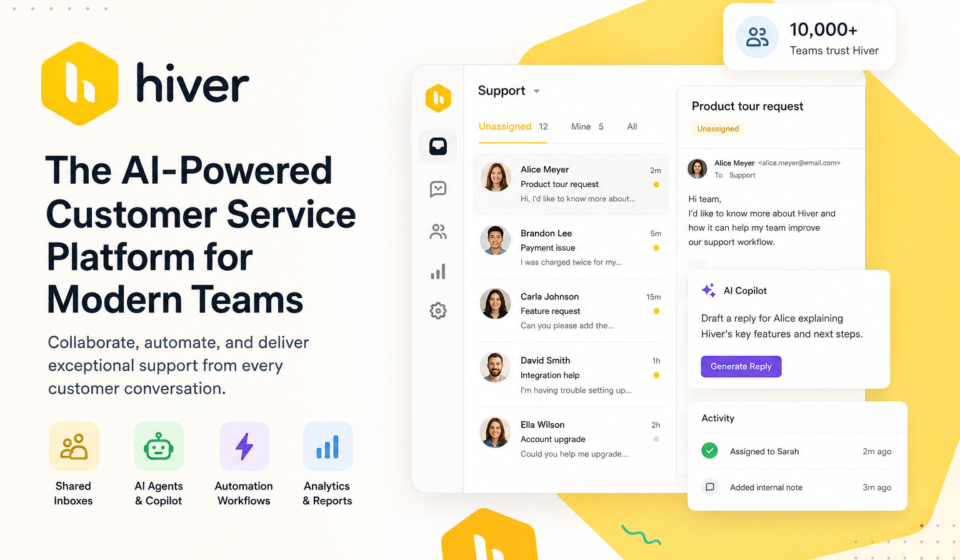
Hiver is an AI-powered customer service platform designed to help teams manage customer conversations and internal workflows from a shared workspace.
One of its main advantages is its ability to work directly with familiar email environments. With Hiver in Gmail, teams can transform shared Gmail inboxes into helpdesk-style workspaces without requiring employees to move to an entirely different interface. Hiver also offers Hiver Omni, a broader platform designed for teams managing conversations across multiple channels.
The platform is built around a simple idea: customer communication should be easy for the entire team to manage, not just the individual employee who happens to receive an email.
Instead of forwarding messages, copying coworkers, or maintaining complicated spreadsheets to track requests, teams can assign conversations, collaborate internally, automate workflows, and monitor resolution progress from one place.
Hiver currently says that more than 10,000 teams use its platform globally.
Why Shared Inboxes Become Difficult to Manage
A shared inbox sounds simple.
Imagine five customer support agents working from support@company.com. Every agent can see the same messages, so it seems like the team should be able to respond quickly.
In practice, several problems can appear:
- Two agents respond to the same customer.
- Nobody knows who owns a conversation.
- Important requests remain unanswered.
- Employees repeatedly forward emails to one another.
- Managers have limited visibility into workload.
- Response-time targets are difficult to track.
- Customer information is scattered across multiple tools.
- Repetitive questions consume valuable agent time.
As the number of incoming conversations increases, these problems become more expensive.
Hiver addresses this by adding ownership, collaboration, automation, reporting, and AI capabilities to the customer communication workflow.
How Hiver Works
At its core, Hiver changes the way a team interacts with a shared inbox.
A typical workflow can look like this:
The important distinction is that Hiver is not simply another email client. It adds a layer of customer-service functionality around the communication channels teams already use.
Key Hiver Features
Hiver provides a complete set of tools to help support and operations teams manage conversations more efficiently and deliver a better customer experience.
1. Shared Inboxes
Shared inboxes are one of Hiver’s foundational features.
Teams can manage addresses such as:
- support@
- info@
- billing@
- sales@
- finance@
- hr@
- it@
Instead of treating the inbox as an ordinary mailbox, Hiver allows teams to turn incoming conversations into organized work that can be assigned, tracked, and managed.
This gives everyone greater visibility into what has been received, what is being handled, and what still requires attention.
2. Email Assignment and Ownership
One of the biggest problems with shared email is uncertainty.
Who is handling this customer?
Hiver allows conversations to be assigned to specific team members, creating clear ownership.
This simple change can dramatically improve accountability because employees can immediately see which conversations belong to them instead of constantly checking whether someone else has already responded.
Hiver also provides collaboration features designed to reduce duplicate or conflicting responses.
3. Internal Collaboration
Customer support rarely involves only one person.
An agent may need information from finance, sales, engineering, IT, or an account manager before answering a customer.
Traditional email collaboration often means forwarding messages or adding people to long CC chains.
Hiver replaces much of that friction with internal notes, mentions, linked issues, and collaboration features that keep the discussion connected to the original customer conversation.
The result is a cleaner workflow where customers don’t have to see every internal discussion.
4. Automation and Workflows
Repetitive support work is one of the easiest places for automation to create value.
Hiver can automate tasks such as:
- Routing incoming requests
- Categorizing conversations
- Assigning ownership
- Triggering follow-ups
- Updating information in connected systems
- Managing recurring workflows
For example, a company could create a workflow that automatically routes billing-related messages toward the finance team while sending technical questions to support specialists.
Hiver’s automation capabilities are designed to reduce manual triage and keep conversations moving without requiring an employee to perform every administrative step.
5. AI Copilot
Hiver’s AI capabilities go beyond simply generating generic email replies.
Its AI Copilot can help teams draft responses, find relevant information, summarize context, and suggest next steps.
According to Hiver, Copilot can use sources such as knowledge bases, previous conversations, URLs, PDFs, Notion, CRM information, and other connected systems to help produce more context-aware responses.
This is particularly useful when an agent needs to answer a complicated question but does not want to search through multiple systems before responding.
The agent remains in control while AI handles much of the research and preparation.
6. AI Agents
Hiver also offers AI Agents designed to take on more autonomous tasks.
Rather than simply suggesting what an employee should write, AI Agents can be used to handle certain requests and workflows from beginning to end.
This creates a different model of customer support:
Human agents handle the situations that require judgment and empathy, while AI handles appropriate repetitive or predictable requests.
The goal isn’t necessarily to eliminate human support. Instead, it is to allow support teams to spend more time on complicated conversations where human involvement provides the most value.
7. AI Quality Assurance
Maintaining response quality becomes increasingly difficult as support teams grow.
Hiver’s AI QA capability evaluates conversations for factors such as tone, empathy, completeness, and quality.
Instead of manually reviewing a small sample of conversations, managers can use automated analysis to identify potential quality problems and coaching opportunities.
This can be particularly valuable for organizations handling large numbers of customer interactions.
8. Analytics and Performance Tracking
Customer support should not be measured only by how many emails an agent answers.
Teams also need to understand response times, resolution performance, SLAs, workload, and recurring customer issues.
Hiver provides analytics designed to help managers understand how their support operation is performing and identify areas that need improvement.
This turns the shared inbox from a communication tool into a source of operational data.
Hiver’s Omnichannel Approach
Email remains one of the most important customer service channels, but customers rarely communicate through only one medium.
Hiver Omni brings multiple channels into a unified workspace, including:
- Live chat
- Slack
- Voice
- Web forms
- Customer portal
- Help center
The goal is to give agents one place to manage conversations while allowing customers to use the channel they prefer.
For growing support organizations, this can be significantly easier than maintaining separate systems for every communication channel.
Hiver Integrations
Customer support rarely exists in isolation.
Agents may need information from a CRM, project-management system, accounting platform, or internal knowledge base.
Hiver supports integrations with tools such as CRM platforms, Jira, Linear, NetSuite, and other business systems, allowing customer context to be surfaced without forcing agents to constantly switch between applications.
This becomes particularly important for complex support requests where the answer depends on information outside the inbox.
Who Should Use Hiver?
Hiver can be useful for much more than traditional customer support teams.
Customer Support
Support teams can manage incoming requests, assign conversations, automate repetitive work, and track response performance.
Finance
Finance teams can organize shared inboxes for billing, invoices, payments, and accounts payable.
Sales
Sales teams can manage requests such as quotes, RFQs, and customer inquiries while keeping CRM information connected to conversations.
Operations
Operations teams can use shared inboxes for vendor communication, escalations, and high-volume requests.
Human Resources
HR teams can manage employee questions while collaborating with other departments without relying on endless email forwarding.
IT
IT teams can organize internal requests, automate repetitive workflows, and provide self-service resources for common questions.
Account Management
Account managers can keep customer conversations connected to account context, helping teams understand the bigger picture behind each request.
Hiver vs. a Traditional Shared Gmail Inbox
A normal Gmail shared mailbox gives multiple people access to messages.
But access is not the same as workflow management.
| Traditional Shared Inbox | Hiver |
|---|---|
| Shared email access | Structured shared inbox |
| Manual assignment | Conversation ownership |
| Long CC chains | Internal collaboration |
| Manual triage | Automated routing |
| Limited visibility | Performance analytics |
| Repetitive manual replies | AI-assisted responses |
| Separate tools for context | Connected customer information |
| Difficult SLA tracking | SLA and workflow management |
The difference becomes increasingly important as a team grows.
A small team handling a few dozen messages may be comfortable with a normal shared inbox. A larger operation handling hundreds or thousands of conversations needs more structure.
What Makes Hiver Different?
Hiver’s biggest differentiator is arguably its relationship with the inbox.
Many helpdesk platforms require teams to move into a completely separate ticketing interface.
Hiver’s Gmail product takes the opposite approach: it adds helpdesk functionality to an environment teams already understand.
Hiver also supports Microsoft 365 through its Outlook offering, allowing teams to keep their existing email environment while adding features such as assignment, collaboration, automation, AI assistance, SLA tracking, and reporting.
That familiar workflow can reduce the learning curve for teams that don’t want to introduce a completely unfamiliar support interface.
Is Hiver Worth Considering?
Hiver makes the most sense when email has become more than just communication.
If your team is receiving customer requests through shared inboxes, constantly forwarding messages, manually assigning conversations, or struggling to understand response performance, adding a structured workflow can make a meaningful difference.
It is especially compelling for teams that already rely heavily on Gmail and want customer-service capabilities without completely changing how employees work.
For organizations managing multiple communication channels, Hiver Omni offers a broader approach by bringing email, chat, Slack, voice, WhatsApp, and other channels into one workspace.
Final Verdict
Hiver is more than a shared inbox.
It combines collaborative email management, workflow automation, analytics, integrations, omnichannel communication, and AI capabilities into a customer-service platform designed around the way modern teams actually communicate.
Its strongest advantage is the ability to bring structure to conversations without forcing teams to abandon familiar email workflows.
For a small team with very low email volume, a traditional inbox may still be enough.
But once customer conversations become complex, responsibilities become unclear, and manual processes start consuming valuable time, Hiver becomes a much more interesting option.
The real value isn’t simply answering emails faster.
It’s creating a support operation where every conversation has an owner, every team member has the context they need, repetitive work can be automated, and managers can see what is actually happening.
That’s what makes Hiver worth considering for teams that want to turn their inbox into a genuine customer-service operation.
Frequently Asked Questions
Is Hiver a helpdesk?
Yes. Hiver provides helpdesk and customer-service capabilities including shared inboxes, ticketing, assignment, automation, analytics, collaboration, AI, and omnichannel support.
Does Hiver work with Gmail?
Yes. Hiver in Gmail adds customer-service functionality directly to Gmail, including shared inboxes, workflows, collaboration, AI, and reporting.
Does Hiver work with Outlook?
Yes. Hiver provides an Outlook shared-mailbox solution that works with Microsoft 365 and adds helpdesk-style capabilities to the existing email environment.
Can Hiver automate customer support?
Yes. Hiver supports workflow automation for activities such as triage, routing, categorization, follow-ups, and other repetitive processes.
Does Hiver use AI?
Yes. Hiver offers multiple AI capabilities, including AI Copilot, AI Agents, AI QA, and AI Insights, depending on the product and plan.
Is Hiver suitable for teams outside customer support?
Yes. Hiver specifically highlights use cases for finance, operations, sales, HR, account management, and IT in addition to customer support.